
The WebCharge Interface
The WebCharge interface consists of 3 main areas: the Links Pane, the Content Pane and the Status Bar.
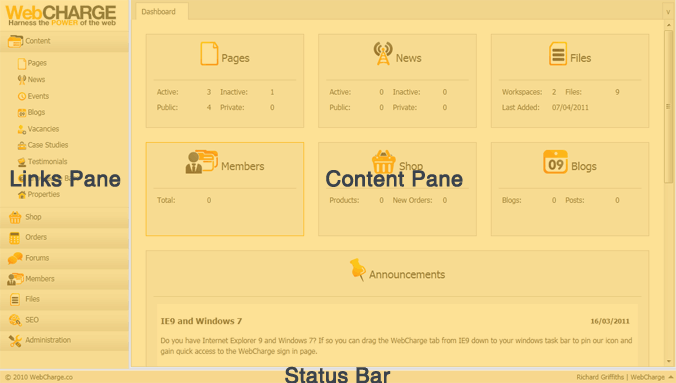
Links Pane
The Links Pane gives access to the different types of website content that can be managed through WebCharge.
The content types are grouped, and each group can be expanded or collapsed for ease of access. The groups and links available within the Links Pane will depend on the permissions of the user.
Content Pane
The Content Pane is the largest area of the interface; this is where the bulk of the work takes place.
The Content Pane initially displays the Dashboard which shows a summary of the website content along with a list of the latest system announcements, to help you to quickly see important content information.
Status Bar
The Status Bar shows the current logged in user and a pop-up menu provides access to help features and to a sign out button. The Status Bar also offers access to other sites if more than one website is available for management.
Tabs
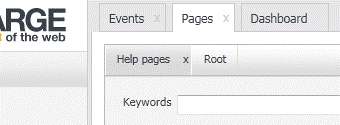
The WebCharge Content Pane is tab-based to provide ease of access and familiarity. Clicking a link in the Links Pane will open up a new main tab within the Content Pane.
At the very top of the Content Pane you will see the main tabs bar that will display all of the open tabs. Each tab can be clicked to display its content and the tabs also contain an 'x' button for closing them.
Each Main tab also contains a sub tab bar (in the top right hand side corner) that manages access to the content within the main tab.
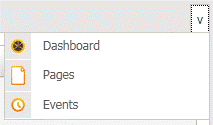
The WebCharge interface is fluid and will resize to the size of your browser window, allowing you to fully utilise your screen size. The size of the browser window will determine how many tabs are visible at any one time, and the tab manager provides convenient access to all open tabs, allowing you to activate the content for tabs that are outside of the screen area.
Selecting a tab in the tab manager will move it to the beginning (left hand side) of the tab bar if that tab is currently off screen.